
From Compliance to Core Operations: Building Accessibility As Shared Infrastructure
Immediate Actions and Long-Term Strategies for Higher Ed Institutions
Once treated as a course-level concern, accessibility has become one of the most consequential infrastructure challenges facing higher education today. As compliance deadlines approach, institutions are discovering that the real cost of accessibility gaps is no longer measured in formal complaints, but surfaces in operational strain, student exclusion, and systems failing the very people they were built to serve.
“Technology now touches every single phase of the student experience, from recruitment and enrollment to advising, financial aid, and the learning environment itself,” says Dr. Laura Romeo, Director of Digital Learning Innovation, Scholarship, and Educational Services at Edge. “When decisions about those systems are made without accessibility in mind, the impact scales very quickly. A single inaccessible form or portal can quietly affect thousands of students before anyone raises a concern.”
The regulatory landscape has made the urgency impossible to ignore. The ADA Title II Final Rule has established WCAG 2.1 Level AA as the federal standard for public institutions, with compliance deadlines tiered by population served: April 2026 for institutions serving 50,000 or more, and April 2027 for those under 50,000. For private institutions, Sections 504 and 508 and the Americans with Disabilities Act continue to apply, with the Department of Justice actively enforcing standards across all institution types.
“Wherever you are with your specific deadline, the question is really about how you are strategically approaching it, and that starts with how you define accessibility in the first place,” says Romeo. “When accessibility is defined narrowly as a compliance checkbox, institutions tend to find themselves in a reactive cycle. They scramble before a deadline, run some scans, fix the most visible issues, and move on. But the same problems keep coming back because nothing structural has changed.”
“A more effective framework positions accessibility at the intersection of three distinct but interconnected principles,” continues Romeo. “Compliance is the floor—meeting the legal standards is where it starts, but it cannot be where it ends. The second dimension is usability: can people actually use these systems in real conditions, on a mobile device, with slow internet, using a screen reader, under time pressure? And the third is equity: is the experience consistent across your institution, or does it depend on which department built the form or which faculty member set up the course? When you consider all three together, it fundamentally changes how you approach accessibility, and it makes clear that this cannot be one office’s responsibility.”
Removing Barriers to Student Success
“Students don’t see departments, they see their institution,” explains Romeo. “They visit the website, apply, register for classes, navigate their LMS, interact with financial aid, and use advising tools. To them, it is a single, continuous experience. If one of those touchpoints creates a barrier, it doesn’t matter how smooth everything else is. That barrier is what shapes their frustration, and ultimately, whether or not they decide to stay.”
Federal compliance standards reflect this reality. Institutions are evaluated as a whole, not department by department. A student who can access a website but cannot complete registration has not been given equal access, and that is precisely why accessibility cannot live in one office or belong to one team.
 “Most accessibility barriers are not created by people who don’t care,” says Romeo. “They are created by people who are busy, doing their best, and who simply don’t have accessibility built into how they currently work. A new student-facing tool gets selected based on features, cost, and integration capabilities, but nobody asks for a Voluntary Product Accessibility Template (VPAT) or tests it with a screen reader. None of it is intentional, but the result is the same: barriers accumulate across systems and across semesters.” Continues Romeo, “Many institutions are addressing symptoms without ever resolving the underlying cause. They are operating in triage mode—scanning, finding problems, fixing them one at a time. The more strategic question is: what in your process is producing these barriers, and what would it take to change that?”
Accessibility failures surface differently across operations, IT, communications, academic affairs, and student services. “On the operational side, they show up as strain,” explains Romeo. “The help desk fielding the same questions about a portal that doesn’t work with assistive technology. The staff member manually processes requests that should be self-service. Nobody is tracking the total staff hours spent working around an inaccessible registration workflow, or putting a number on the student who left because the financial aid portal was too frustrating to navigate. But those costs exist, and they add up.”
Looking Through an Accessibility Lens
For technology teams, accessibility risk is often hiding in plain sight. “A scenario that plays out more often than people realize: a student tries to complete a financial aid verification form, but the dropdown menus don’t work with keyboard navigation and field labels are disconnected from their text boxes,” shares Romeo. “The student calls the office, a staff member completes it through a different pathway, and now there is a data integrity question, and potentially a FERPA question. From the IT side, it looks like a data anomaly. The root cause is accessibility.”
“One of the most useful things an IT team can do right now is review support tickets through an accessibility lens,” continues Romeo. “Before concluding that something is user error, ask one additional question: could this be about how the system was designed? That shift alone can surface patterns that have been easy to overlook.”
For communications and marketing teams, the stakes are equally significant and more publicly visible. “Your website is the first place a prospective student or family will encounter your institution,” says Romeo. “If it is not keyboard navigable, if PDFs are not tagged, if videos don’t have accurate captions, that communicates something about your institution’s values, whether it was intended or not.”
Accessible communication practices serve every audience well. Plain language helps all readers. Captions help people in noisy environments and those watching content in a second language, not only those who are deaf or hard of hearing. Good web structure supports search engine optimization.
Faculty face a parallel challenge. “Consider the volume of content inside your LMS,” says Romeo. “Documents, slides, videos, assignments, and discussion boards running across every section, every department, every semester. Most of it was created without accessibility in mind—not because faculty are being careless, but because most faculty were never taught what accessible content looks like. A screen reader cannot navigate an untagged PDF. Bold text does not create heading structure. There is a knowledge gap that institutions now have a responsibility to close.”
"A more effective framework positions accessibility at the intersection of three distinct but interconnected principles. Compliance is the floor—meeting the legal standards is where it starts, but it cannot be where it ends. The second dimension is usability: can people actually use these systems in real conditions, on a mobile device, with slow internet, using a screen reader, under time pressure? And the third is equity: is the experience consistent across your institution, or does it depend on which department built the form or which faculty member set up the course? When you consider all three together, it fundamentally changes how you approach accessibility, and it makes clear that this cannot be one office’s responsibility."
– Dr. Laura Romeo
Director of Digital Learning Innovation, Scholarship, and Educational Service
Edge

“The institutions making the most meaningful progress have approached this as a training and support issue rather than a compliance mandate,” Romeo says. “Help faculty understand why accessibility matters, then move to the practical: here is how to add alt text, here is how to check heading structure, here is how to review your captions. When people are given the skills and the templates, most run with it. The mindset shifts from this is a requirement to this is for my students.”
Third-party vendors and publisher platforms also factor into an institution’s overall compliance picture. “If you are using publisher platforms, eTextbooks, or homework tools, your compliance depends partly on theirs,” says Romeo. “The question to ask is whether you have a VPAT—their documentation of how their product measures up against accessibility standards. If a student cannot access required course materials because a publisher’s platform is inaccessible, that becomes the institution’s problem to solve, even though the institution did not build the tool.”
Closing Accessibility Gaps
Artificial intelligence has emerged as a frequent topic in accessibility conversations. “AI can genuinely help,” explains Romeo. “Auto-captioning has improved significantly, AI can draft alt text and flag patterns across large content libraries, and can catch common errors at a speed no human team can match. But AI output is not the same thing as accessible content. Auto-captions still miss technical terms, proper nouns, and accents. AI-generated alt text may describe an image accurately but miss its purpose in context. The institutions using AI most effectively are treating it as a starting point, not a finished product.”
Student services is where accessibility gaps become most visible. “These are the systems students interact with every day, including advising, scheduling, registration, financial aid, orientation,” explains Romeo. “Students are trying to do something essential, typically on a deadline, and most of the time without a plan B. When those systems have barriers, students don’t always file a complaint. They get frustrated, miss a registration window, or don’t finish a financial aid application and quietly drop off. This is not just a compliance concern, it is a retention concern.”
Promoting Shared Visibility and Communication
A common thread runs through every area of accessibility risk. “In every area, the problems get worse when people are working in isolation,” says Romeo. “Accessibility spans too many functions and systems to rest on any one person’s shoulders. Procurement figures the vendor built it correctly. Communications assumes the web team tested it. Student services assumes someone reviewed the portal. Nobody is necessarily wrong—everyone is simply working with incomplete information.”
“The solution is not a larger committee or a new department, but shared visibility and consistent communication across the teams that are already doing the work,” continues Romeo. “Some of the most effective progress we have seen has started with a monthly 15-to-30-minute call between IT and student affairs, where two teams share what they are seeing. That one conversation can surface issues that neither group would catch on their own.”

Demonstrating a Good Faith Effort
“I hear a version of the same concern regularly: we have thousands of web pages, years of backlogged course content, and dozens of tools in use. There is no way we will be fully compliant by April,” shares Romeo. “And honestly, perfection by the deadline is not realistic for most institutions. Regulators know that. What they are looking for is evidence that you have a system in place and that you are managing accessibility with intention and accountability.”
“A resolution agreement doesn’t demand that everything be fixed immediately,” continues Romeo. “It asks: do you have a policy? Have you conducted an evaluation? Do you have a remediation plan with timelines? Are you training your people? Have you built accessibility into your procurement process? Is there a clear way for someone to report a problem? That is the difference between being vulnerable and being defensible. A lot of institutions are doing genuinely good work but not writing it down, and that needs to change. Document your remediation efforts, log your training, and organize your audit results. That paper trail is your strongest asset right now.”
“Automated tools like WAVE and Lighthouse are free and genuinely good at catching technical issues at scale,” explains Romeo. “But they identify only about 30 to 40 percent of WCAG issues. The rest requires human review—reading order, keyboard navigation, whether alt text communicates the right thing in context. And the most underused data source at most institutions is students and staff, who will tell you what works and what doesn’t. We just need to give them a clear and accessible way to do that.”
Of all the leverage points available, few carry more long-term consequences than procurement. “Every time an institution signs a contract with a technology vendor, an accessibility decision is being made, whether it is recognized as one or not,” says Romeo. “Requiring a current VPAT or Accessibility Conformance Report from every vendor is the place to begin. The more useful question is not whether a vendor is accessible, but: show me that you are. Inventory your student-facing vendor tools and begin collecting VPATs. Most institutions we work with have documentation for roughly a third of their tools at the outset. That gap is important to understand, and the inventory itself becomes valuable compliance documentation.”
“Most accessibility barriers are not created by people who don’t care. They are created by people who are busy, doing their best, and who simply don’t have accessibility built into how they currently work. A new student-facing tool gets selected based on features, cost, and integration capabilities, but nobody asks for a VPAT or tests it with a screen reader. None of it is intentional, but the result is the same: barriers accumulate across systems and across semesters. Many institutions are addressing symptoms without ever resolving the underlying cause. They are operating in triage mode—scanning, finding problems, fixing them one at a time. The more strategic question is: what in your process is producing these barriers, and what would it take to change that?”
– Dr. Laura Romeo
Director of Digital Learning Innovation, Scholarship, and Educational Service
Edge
Adopting an Institutional Commitment to Accessibility
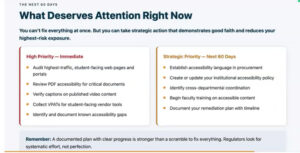
“You cannot fix everything in two months, and that is a reasonable reality to acknowledge,” says Romeo. “Start with your highest-traffic student-facing pages. Look at the critical pathways: admissions, registration, financial aid, and your homepage. Run an automated scan, but also do something simple—tab through the page using only your keyboard. Can you reach every link, every button, every form field? That one test will tell you a great deal. Then look at your critical documents, check your video content for accurate captioning, and begin collecting VPATs from your vendors.
“On the strategic side, build accessibility into procurement. Get your accessibility policy documented and make it public. Establish cross-departmental coordination, begin faculty training, and write your plan down. That documented remediation plan will be one of the most valuable things you have if you are ever asked to demonstrate compliance.”
“If you’re unsure where to begin, pick one system you have influence over and ask three questions,” says Romeo. “Who is expected to use this? What does this system assume—that everyone can see the screen, use a mouse, read at a certain level? And what happens when someone cannot use it? Then pull one person from another department into that conversation. One system, three questions, and one conversation across a department line. That is how this work begins, and how it continues.”
“The institutions we see making real progress are not necessarily the ones with the largest resources,” continues Romeo. “They are the ones where people in different departments have started talking to each other. These conversations add up and shift the culture. And that is what turns a scramble before a deadline into something sustainable long after it passes. Accessibility is everyone’s business.”
Edge Accessibility Compliance Support Services for Digital Learning
Edge Accessibility Compliance Support Services helps institutions move from uncertainty to action. With expert-led readiness assessments, hands-on remediation support, and strategic guidance tailored to each institution’s needs, Edge equips higher education teams with everything they need to meet OCR compliance requirements and build accessibility practices that last.
For more information, contact Michelle Ferraro, Associate Vice President of Business Development and Member Engagement, Edge, at michelle.ferraro@njedge.net, or Erin Brink, Director of Member Engagement, Edge, at erin.brink@njedge.net